

I have seen many store owners struggle to understand why some products do not sell. They often guess where customers go once they enter the front door.
This is where retail heatmap software becomes a game-changer for modern businesses. I want to show you how this technology turns guesses into clear data. By using these tools, you can see exactly how people move and interact with your shop.
In this guide, I will share a clear blueprint for success. We will cover how to use these tools to boost your profits.
You will learn about the tech that makes it work. I will also help you avoid common mistakes. Let’s start with the big wins you can expect from these systems.
Primary Benefits of Implementing Retail Heatmap Software
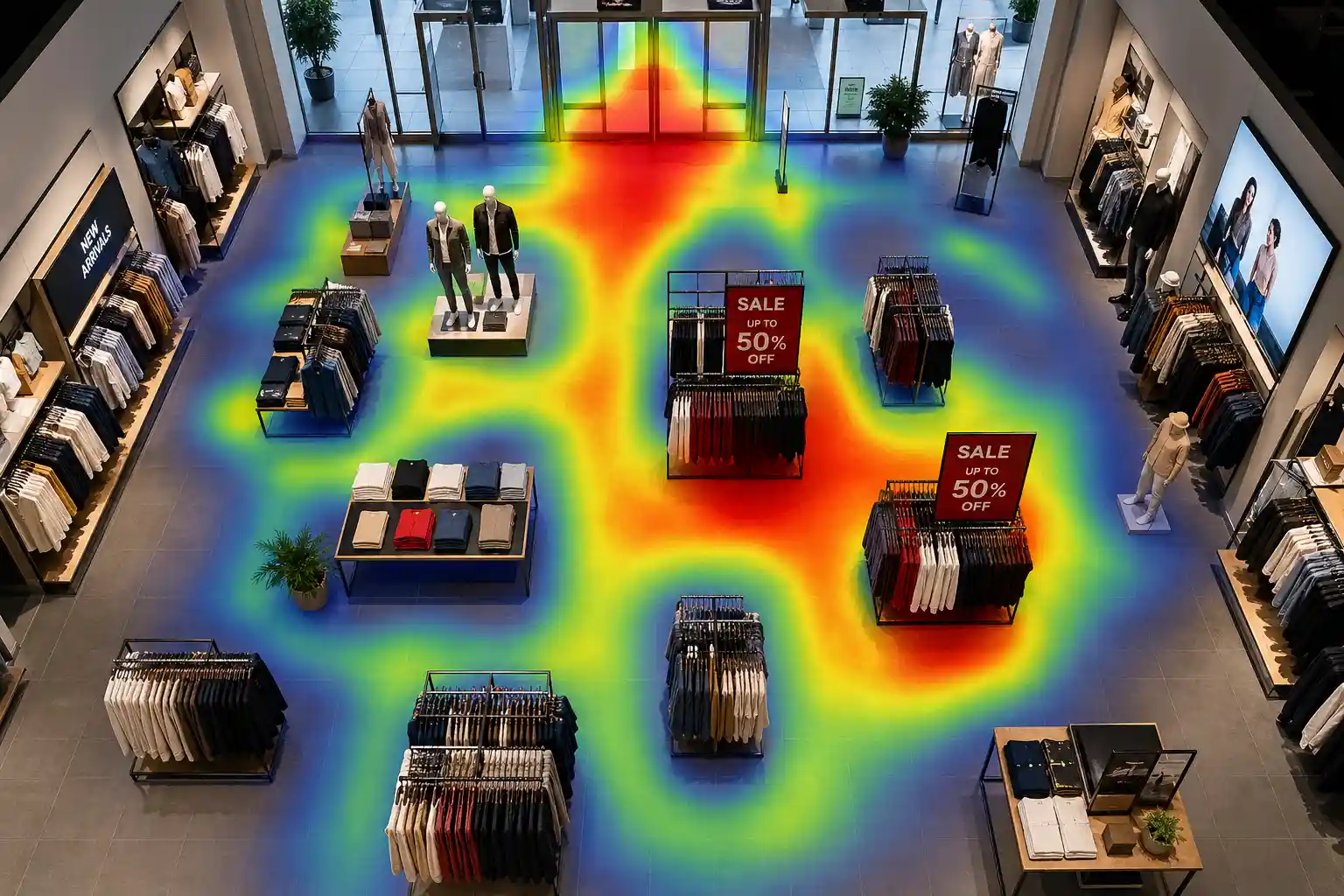
Retail heatmap software helps you spot dead zones and boost revenue per square foot. Every inch of your store costs money in rent and power.
You need to know if every area is working hard for you. If a corner is always empty, you are losing money. These tools help you spot those dead zones quickly.
Store layout optimization is another huge benefit. I have seen stores move a single shelf and see sales jump by ten percent.
Retail heatmap software uses visitor flow mapping to find the best path for your guests. If an aisle feels too tight, customers are more likely to leave. Heatmaps show you where these “traffic jams” happen so you can fix them.
I also use these tools for better staff allocation. You do not want too many workers when the store is empty. You also do not want a crowded store with no one to help.
Retail heatmap software gives you traffic pattern analysis to schedule your team better. This keeps your staff happy and your customers well-served.
Product placement accuracy is the final key benefit. You can test if a new display actually catches the eye.
I suggest comparing two different spots for a top-selling item. The data will tell you which spot drives more sales performance tracking. This takes the guesswork out of merchandising.
Understanding the Technology Behind Retail Heatmaps
I find the technology behind these tools very exciting. Most modern systems use AI-powered computer vision.
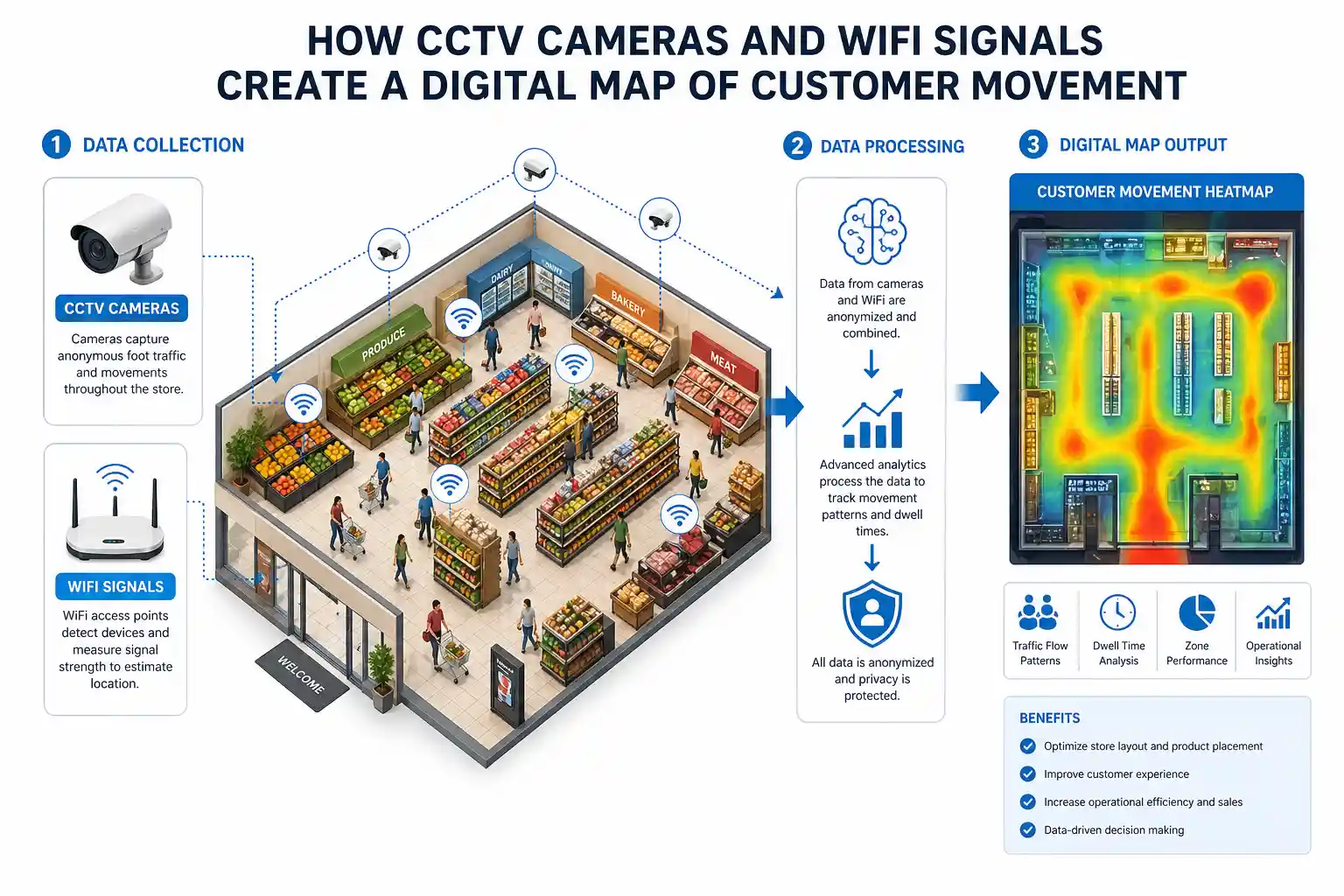
Retail heatmap software connects to AI-powered computer vision through your existing CCTV cameras. The software “watches” the video feed to track movement. It does not need to save faces to work well.
Another common method is WiFi and Bluetooth signal tracking. Many people walk around with their smartphones turned on. These phones send out signals to find a network.
Your system can pick up these signals to see where people linger. It is a great way to measure dwell time measurement across the store.
I also see some stores using 3D depth sensors and thermal imaging. These sensors are very accurate at counting people. They use heat or light pulses to create a 3D map.
This works well even in very dark or very bright areas. It is often the best choice for high-end retail store analytics.
Essential Features for a Modern Analytics Platform
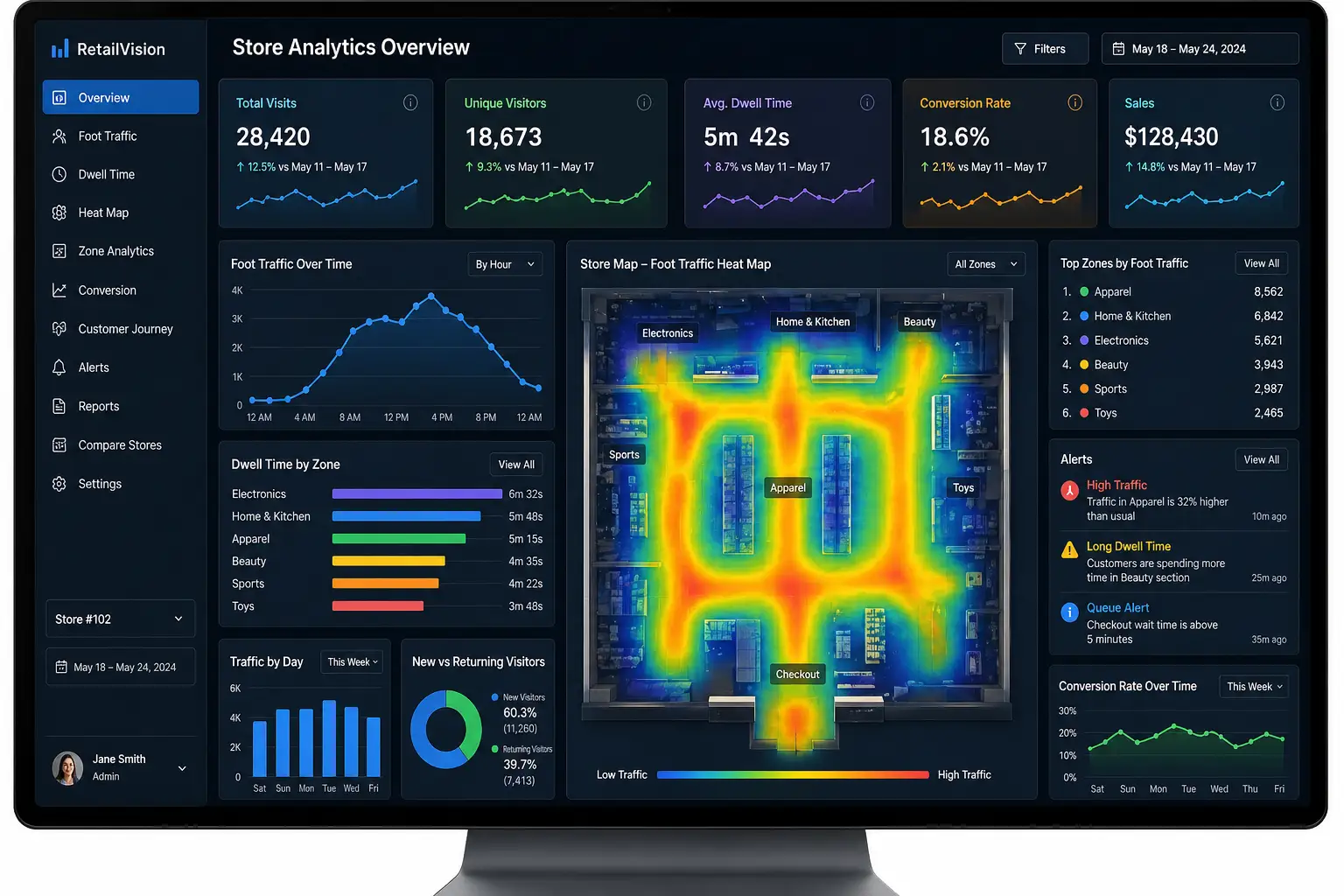
I always look for real-time traffic visualization in any tool. You should be able to see what is happening right now. This helps you react to big crowds immediately.
If the checkout line gets too long, you can open a new lane. Waiting too long is the main reason people leave without buying.
Retail heatmap software with POS integration lets you see your true conversion rate insights. You need to connect your traffic data to your actual sales.
If 100 people visit a display but only one buys, you have a problem. Without POS data, you only see half of the story.
I recommend choosing a platform with multi-location benchmarking. If you own three stores, you should compare them. You can see why one store performs better than the others. Maybe the layout in store A is better than store B. This helps you spread good ideas across your whole business.
Privacy and anonymization tools are essential today. You must keep your customers’ data safe. Good software will blur faces and hide personal details.
I only use tools that focus on privacy. This builds trust with your shoppers and keeps you safe from legal issues.
Steps for Successful Software Implementation
I suggest starting with a full audit of your current cameras. You do not always need to buy new hardware.
Many types of retail heatmap software work with what you already have. Check if your cameras cover the most important areas. You want to see the entrance, the main aisles, and the checkout.
Next, you must define your custom analytics zones. Retail heatmap software lets you define custom analytics zones for key areas like the power wall and the sale bins.
This lets the software track these spots separately. You can then see exactly how many people stop at each specific display. This is much better than just looking at the whole floor.
Retail heatmap software needs proper calibration to filter out staff from customer behavior data. Your workers move around the store all day.
If the system counts them, your data will be wrong. Most AI systems can learn to ignore people wearing your store uniform. This ensures your data stays accurate and clean.
Finally, I integrate the data with marketing calendars. Retail heatmap software helps you measure the real impact of every sale or marketing campaign.
Did the sale bring in new people? Did they visit the sections you expected? Connecting your data to your calendar helps you see which ads work best. This is how you truly improve your ROI.
Strategic Risks and Limitations of Heatmap Data
I want to address the risks openly, too. Managing data accuracy in variable lighting can be hard. Very bright sun or dark shadows can trick some cameras.
If your store has large windows, you might need thermal sensors. Always test your system at different times of the day.
Privacy concerns and legal risks are also important. Different states have different laws about tracking. I always tell my clients to post a small sign about data use.
Be clear that you are tracking movement, not personal identities. Following the rules now prevents big fines later.
I often see people misinterpreting movement data. A “hot” spot on a map means people are standing there. It does not always mean they are happy.
Maybe they are stuck behind a bulky display. I suggest walking the floor yourself to see the context. Data tells you “where,” but you must find out “why.”
Supplemental Insights and Common Questions
I get many questions about the terms we use. One common term is “Dwell Time.” In retail analytics, this means how long a person stays in one spot.
Longer dwell times usually lead to more sales. However, if they dwell at the checkout, it might mean the line is too slow.
A common question is whether these systems require facial recognition. The answer is no. Most systems use body shapes or signals to track movement.
You do not need to know who the person is to see where they go. This makes the system much safer for everyone involved.
I see the best results in grocery stores, clothing shops, and big-box retail. These categories have many aisles and products. They benefit the most from seeing how people move.
Small boutiques can also benefit, but the data is often simpler. Large spaces offer more chances for store layout optimization.
I created this table to help you compare two main types of tracking tech:
| Feature | Computer Vision (Cameras) | WiFi/Bluetooth Tracking |
| Best For | High accuracy in specific zones | Tracking paths across the whole store |
| Privacy | Good (with blurring) | Very Good (uses random IDs) |
| Setup Cost | Medium (uses existing CCTV) | Low (uses routers) |
| Details | Shows exact product interaction | Shows general movement patterns |
Frequently Asked Questions
How often should I check my heatmap data?
I recommend looking at your data once a week. This helps you spot trends without getting overwhelmed. If you run a big sale, check it daily to make quick changes.
Is heatmap software expensive?
The cost varies based on your store size. Many cloud-based options are affordable for small businesses. I find that the increase in sales usually pays for the software quickly.
Can I use heatmaps for outdoor events?
Yes, I have seen this work well for outdoor markets. You might need special weather-proof cameras. The software works the same way to show you where people gather.
I hope this guide gives you greater confidence. Understanding your customers is the foundation for business growth.
By using retail heatmap software, you can make smart choices that lead to real growth.


9 Essential Enhancements to Optimize Your Booth Engagement Measurement Tools
7 High-Performance Contactless Payment Solutions for Booths to Maximize Your Revenue
15 Ironclad Strategies for Remote Store Data Security Management in 2026
Why a Professional Skin Analysis Device is the Must-Have Booth Tool
Innovative Exhibition Engagement Solutions for High-Impact Trade Shows
AI Cameras to Analyze Visitor Behavior: The Comprehensive Guide to Business Intelligence