

I have spent years watching how businesses track their visitors. It used to be a simple task of counting heads at the door.
Today, the world of retail and building management is much more complex. Modern businesses need to know more than just how many people walked in. They want to know where people go and how they behave.
This is why choosing the right foot traffic sensor software has become a top priority for smart leaders. In this guide, I will show you how these tools have changed and which ones are leading the pack for 2026.
Data is the new currency for physical spaces. If you own a shop or manage an office, you need clear insights. You need to know when your peak hours are.
You need to understand if your window displays actually draw people inside. We are moving away from simple guesses. We are moving toward a world of predictive intelligence. Let’s dive into how this technology works and which platforms will help you grow your business this year.
1. Defining the New Era of AI-Driven Foot Traffic Intelligence
The days of basic “clicker” counters are long gone. We are now in an era where AI does the heavy lifting.
A modern people counting system does not just count “one, two, three.” It uses advanced algorithms to understand the flow of human movement. This shift allows us to see patterns we never noticed before. We can now see how long a person stands in front of a shelf. We can track how quickly a queue moves at the register.
1.1 Transitioning from Simple Counting to Behavioral Analytics
I often tell my clients that a number without context is useless. Knowing 1,000 people entered your store is fine. Knowing that 200 of them left without buying anything is better.
Behavioral analytics provide more advanced insights. Foot traffic sensor software helps you treat your physical store like a high-performing website. It identifies “dwell times” and “bounce rates” for physical aisles to show you the “why” behind movement.
1.2 The 3 Non-Negotiable Pillars: Precision, Real-Time Dashboards, and Actionable Data
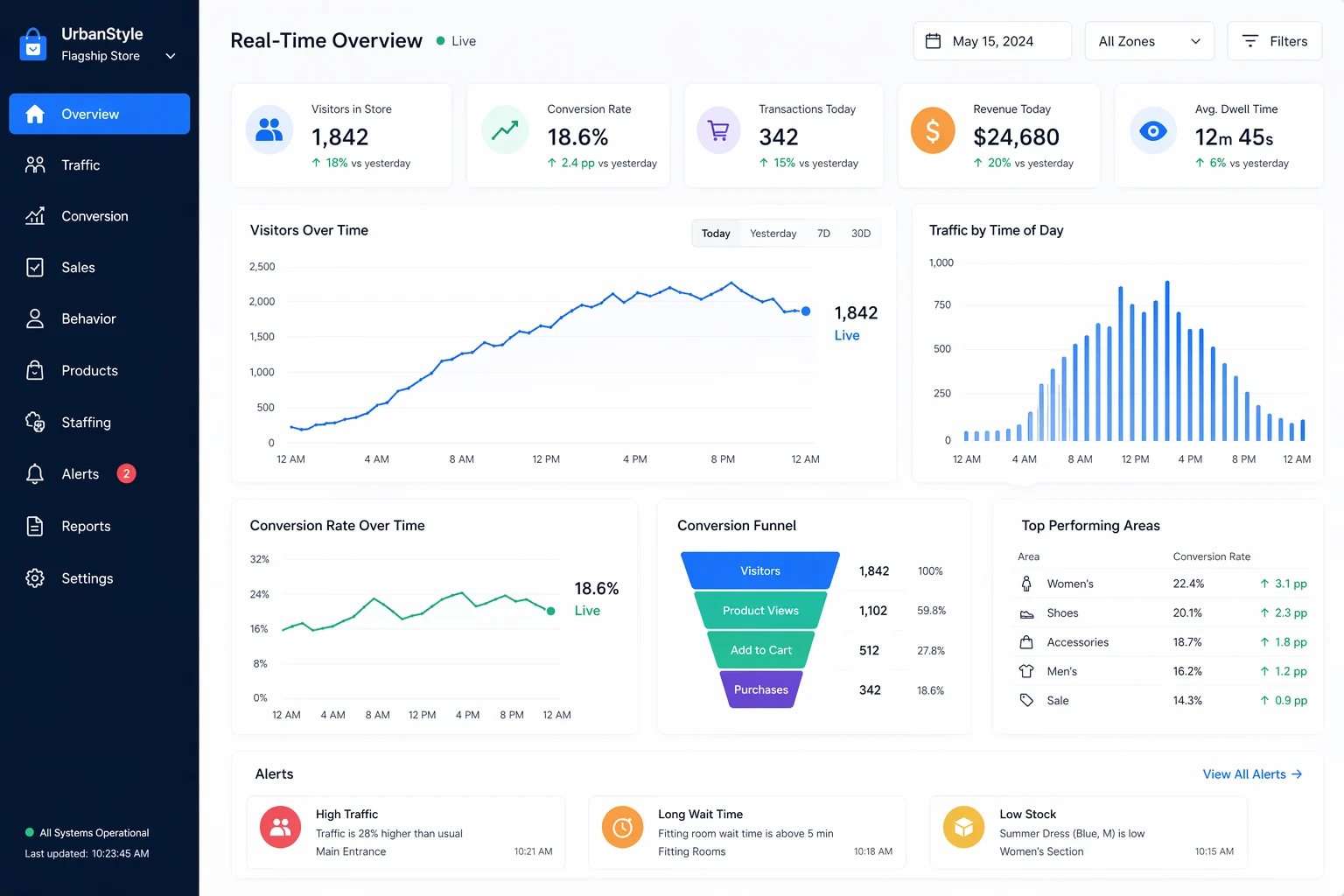
Foot traffic sensor software must offer precision, real-time dashboards, and actionable data. If your data is 20% off, your decisions will be wrong too.
You need to see what is happening right now, not just last week. The software should tell you to “add a staff member to the back corner” rather than just showing a graph. These pillars ensure your investment pays off quickly.
2. Critical Software Integrations with Modern Sensor Hardware
Software is only as good as the hardware it talks to. In 2026, the best platforms work with many types of sensors. This flexibility is key for growing businesses.
You might start with one type of sensor and add others later. Good foot traffic sensor software acts as a central brain for all your different sensor inputs.
2.1 Computer Vision and AI-CCTV Software
Many businesses now use their existing security cameras for visitor traffic monitoring. Foot traffic sensor software can turn a standard video feed into a data goldmine.
This software identifies human shapes and tracks their path. It is a cost-effective way to get high-level data without buying all new hardware. It also helps with security and safety at the same time.
2.2 LiDAR and 3D Depth-Sensing Platforms
LiDAR is not just for self-driving cars anymore. It is becoming very popular for indoor positioning systems. Foot traffic sensor software integrates with LiDAR to provide incredible indoor accuracy through 3D mapping.
It works perfectly in total darkness or very bright light. For high-end retailers, this is often the gold standard for tracking the customer journey.
2.3 Privacy-Centric Thermal Imaging Solutions
Privacy is a huge concern for everyone today. Thermal imaging is a great solution here.
Thermal imaging foot traffic sensor software creates a heat map of movement without ever recording a person’s identity. This makes it much easier to follow global privacy rules like GDPR. It is a safe and smart choice for public spaces.
2.4 Wireless Signal Analysis: WiFi and Bluetooth Probe Software
Almost everyone carries a smartphone. WiFi and Bluetooth probe software can detect these signals to track movement.
While it is less precise for counting exact heads, it is great for seeing how often people return. Foot traffic sensor software paired with WiFi probes gives a full picture of the street-to-store funnel. It helps you understand “loyalty” and “capture rates” from the sidewalk.
3. High-Performance Software Features that Transform Data into Profit
How does data become money? It happens through smart features that link movement to sales. If you are not using these features, you are leaving money on the table.
I always look for platforms that offer these specific tools.
3.1 Automated POS Integration for Real-Time Sales Conversion Rates
The most important feature of any foot traffic sensor software is automated POS integration. By linking your foot traffic data to your Point of Sale (POS) system, you get your conversion rate instantly.
If 100 people enter and 10 buy something, your rate is 10%. Conversion rate tracking helps you see if your staff is performing well. It also shows if your marketing is bringing in the right kind of buyers.
3.2 Heatmapping and Customer Path Visualization Tools
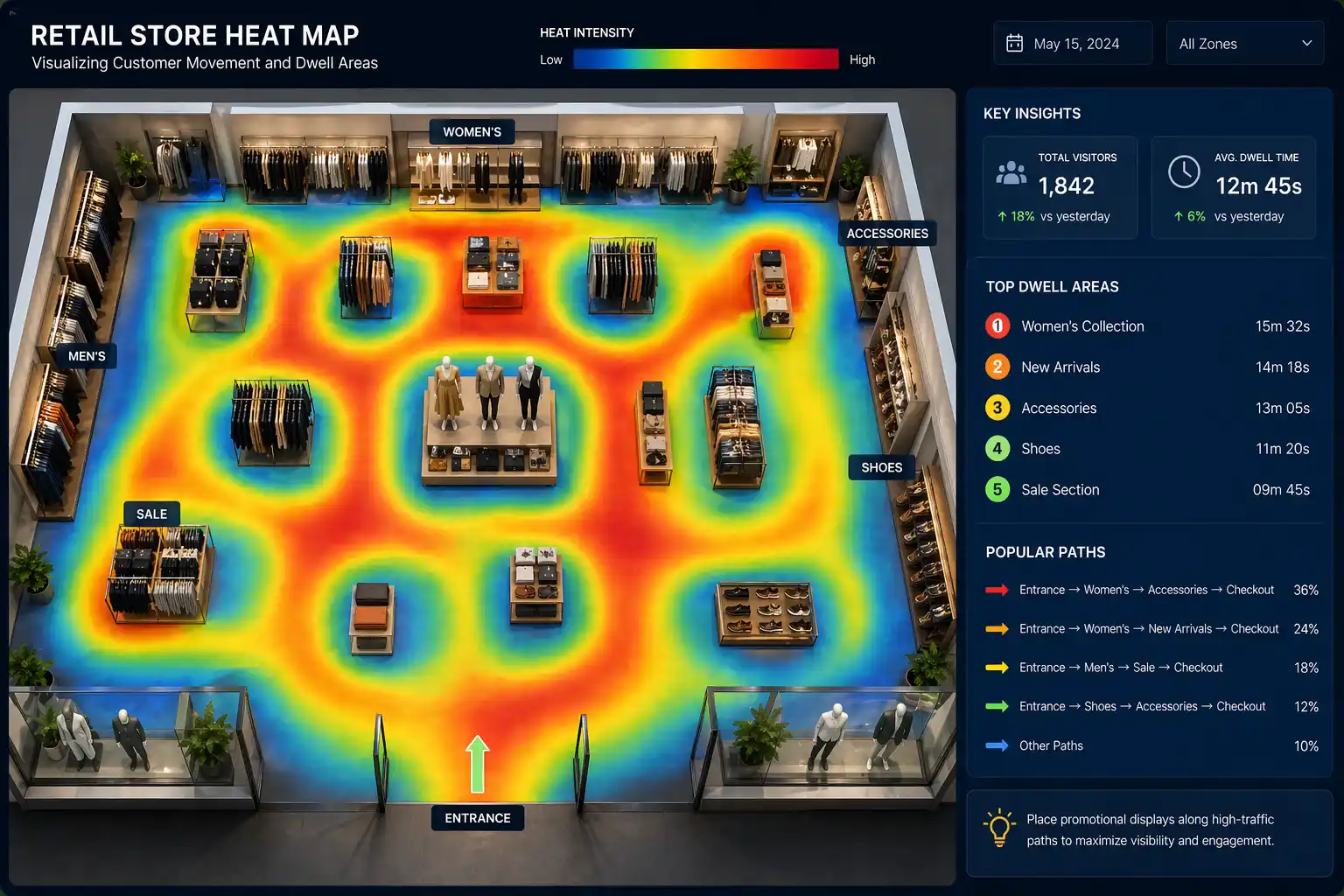
Foot traffic sensor software shows your hot and cold zones through visual heatmapping tools. Red areas indicate where people spend the most time. Blue areas show spaces that receive little attention.
I have seen stores completely change their layout based on these maps. Moving a popular item to a “cold” zone can breathe new life into a dead corner of your shop.
3.3 Intelligent Staff Filtering and Exclusion Algorithms
Your employees walk in and out of the door all day. If your software counts them as customers, your data is wrong.
Modern foot traffic sensor software uses AI to filter out staff and count only real customers. It can recognize staff uniforms or use “exclusion tags.” This small feature makes a massive difference in data integrity.
3.4 Predictive Labor Forecasting and Queue Management
Foot traffic sensor software with predictive labor forecasting helps you schedule staff smarter. It can tell you that next Tuesday at 2:00 PM will likely be busy.
It also monitors queues in real-time. If a line gets too long, the system can alert a manager to open another register immediately.
4. Specialized Industry Solutions for Global Occupancy Management
Different industries have different needs. A hospital doesn’t care about “conversion rates,” but it cares deeply about safety.
Foot traffic sensor software must adapt to the specific safety and compliance goals of each industry. It should be versatile enough to serve retail, offices, and public infrastructure alike.
4.1 Retail and Commercial Real Estate Optimization
For malls and shops, it is all about rent and revenue. Owners use footfall data management to set fair rent prices. High-traffic areas cost more.
It also helps retail brands decide where to open their next location. They look for “look-alike” traffic patterns in new cities.
4.2 Smart Office Efficiency and Desk Utilization
The way we work has changed. Many offices now use space utilization analytics to see which desks are actually used.
If half the office is always empty, the company can downsize and save millions. Smart building sensors help manage heating and cooling based on how many people are in a room.
4.3 Public Infrastructure: Safety and Compliance in Transit Hubs
In train stations and airports, real-time occupancy tracking is a matter of safety. If a platform gets too crowded, it becomes a risk.
Software can trigger automatic alerts to security. This helps transit hubs stay compliant with fire codes and safety laws without manual counting.
5. Ranking the Top 10 Foot Traffic Sensor Software Platforms in 2026
Based on my research and market trends, here are the leaders for 2026. These platforms offer the best mix of features, support, and reliability.
| Software Provider | Key Strength | Best For |
| RetailNext | Full Customer Journey AI | Large Retail Chains |
| Density | Privacy-First Depth Sensing | Corporate Offices |
| Dor | Easy Battery-Powered Setup | Small Businesses |
| V-Count | Global Cloud Analytics | Shopping Malls |
| Scanntech | Grocery & FMCG Integration | Supermarkets |
| Kepler Analytics | Radio-Frequency Insights | Apparel Stores |
| Sensormatic (ShopperTrak) | Massive Global Benchmark Data | Enterprise Brands |
| Bluefox | Real-Time Mobile Sensing | Smart Cities |
| Traf-Sys | Reliable Hardware Variety | Libraries & Museums |
| Axper | Combined 3D & WiFi Data | Luxury Boutiques |
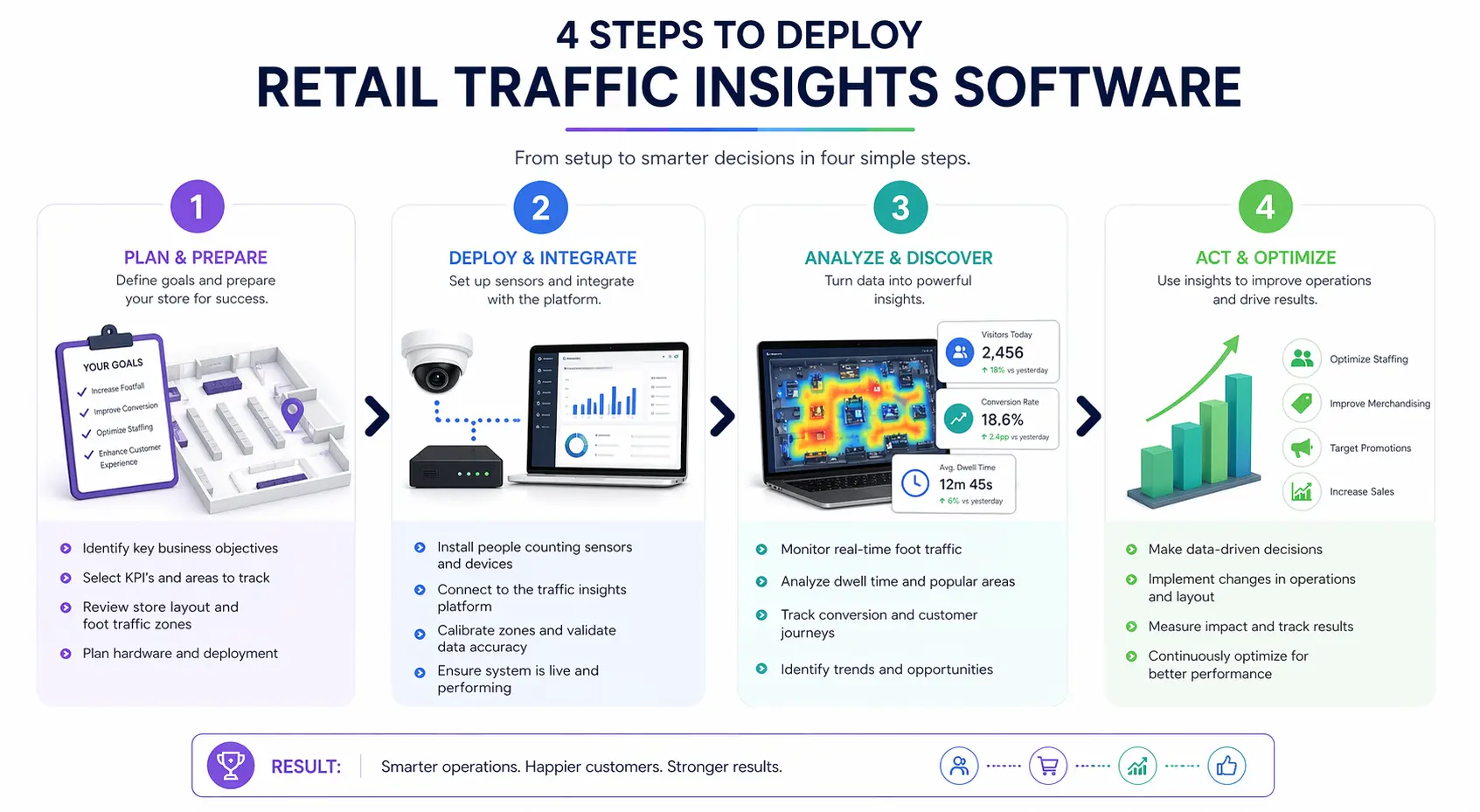
5.1 A 4-Step Strategic Deployment Checklist
Selecting the software is just the first step. You must install it correctly. I suggest following these four steps to ensure success. Skipping even one can lead to big headaches later.
Step 1: Auditing Hardware Compatibility and Connectivity
Check your current internet speed and camera types. Make sure your sensors can “talk” to the software without lag. If you have old cameras, see if they support “edge processing” for faster data.
Step 2: Defining Cross-Platform API Integration Requirements
Your data shouldn’t live in a bubble. Make sure the software can send data to your POS and HR systems. This is usually done through an API. Ask the vendor for their integration list before you buy.
Step 3: Verifying Global Privacy Compliance (GDPR/CCPA)
Privacy laws are getting stricter. Ensure your software masks faces or uses anonymous data. This protects you from legal trouble, and builds trust with your customers.
Step 4: Establishing a Total Cost of Ownership (TCO) Model
Don’t just look at the monthly price. Include installation, training, and maintenance. Some “cheap” options become very expensive when things break. A TCO model gives you the real ROI.
6. Strategic Insights and Risk Mitigation FAQs
In this section, I will answer some of the most common questions I get from business owners. Understanding these technical points will help you sound like an expert during sales meetings.
6.1 What is Edge Processing in modern traffic software?
Edge processing means the data is calculated right on the sensor or camera. It does not send raw video to the cloud.
This is much faster and uses less bandwidth. It is also more private because sensitive images never leave the device.
6.2 Can existing security cameras run advanced analytics software?
Yes, they usually can. However, the camera needs to be at the right angle. A camera tucked in a corner might be great for security but bad for counting.
Many modern software platforms can use a “plugin” to connect to your existing NVR system.
6.3 SaaS vs. On-Premise: Which software model offers better ROI?
Software as a Service (SaaS) is usually better for most. It has lower upfront costs and gets automatic updates.
On-premise is only better for very large companies with strict data security rules. For 90% of businesses, SaaS offers a faster return on investment.
6.4 Which platforms are categorized as “Enterprise” vs. “Small Business”?
RetailNext and Sensormatic are definitely “Enterprise.” They handle thousands of locations.
Dor and Traf-Sys are great for “Small Business.” They are easier to set up and more affordable for a single shop. Always choose a tool that fits your scale.
6.5 Mitigating Implementation Risks and Ensuring Long-Term Data Integrity
To keep your data clean, do regular audits. Walk through your door and check if the counter matches your manual count.
When the data starts to fall off, adjust the sensors. High-quality retail traffic insights depend on constant maintenance.
In summary, the right data can transform your business. We have seen how AI and new sensors make tracking easier than ever.
Whether you choose LiDAR, thermal, or video, the goal remains the same. You want to understand your visitors better.
Foot traffic sensor software helps you make smarter decisions, optimize staffing, and ultimately drive higher sales. Start small if you have to, but start today. The future of your physical space depends on the intelligence you gather now.


17 High-Speed Hacks for the Ultimate Quick Booth Breakdown Checklist
6 Key Insights into Choosing the Right Automatic Label Printer for Cosmetic Products
7 Critical Insights From Camera-Based Retail Heatmaps to Boost Store Revenue
7 High-Performance Contactless Payment Solutions for Booths to Maximize Your Revenue
18 Critical Strategies to Dominate Your Retail Niche with a Remote Store Management System
8 Pro Strategies to Master How to Set Up Fast Payments at Booths and Eliminate Queues Forever