

Every retailer wants to know what shoppers do inside their stores. Traditional methods like manual counting often fail to capture the full picture.
Modern technology now offers a more powerful solution to this age-old problem. We believe that AI heatmap analysis for retail stores is the best way to understand your customers. This technology uses smart sensors to track how people move and interact with products. By using these insights, you can make better decisions that lead to higher sales.
In this guide, we will explore how AI transforms retail data into actionable growth. We will look at technical frameworks and layout optimization.
We will also discuss staffing and data privacy standards. Our goal is to help you use visual heatmaps to create a better shopping experience. Let us dive into the technical details of how this works.
1. Technical Framework: AI Sensors and Data Processing
The foundation of any good analytics system is the quality of its data. Legacy systems used simple heat sensors that only detected movement.
These older tools often counted shadows or shopping carts as people. AI sensors are much more advanced and reliable. They use computer vision to understand the environment in real time.
1.1 Precision Intelligence: How AI Surpasses Legacy Sensors
AI heatmap analysis for retail stores starts with choosing the right sensors for your environment. AI sensors use object classification to distinguish between people and objects.
They can tell the difference between a shopper and a stocking cart. This prevents the data from becoming skewed by non-human movement. We can also use behavioral filtering to remove staff members from the data. This ensures your foot traffic analysis only reflects actual customer movement.
AI heatmap analysis for retail stores goes beyond simple counting to reveal behavioral patterns. The sensors identify when a person stops to look at a product.
They also record how long that person stays in one spot. This level of detail is vital for understanding consumer engagement levels.
1.2 Hardware Comparison: IP Cameras, 3D ToF, and LiDAR
Choosing the right hardware depends on your store size and ceiling height. Many retailers start with existing IP cameras. These cameras use AI software to process video feeds. They are cost-effective but may have blind spots in large areas.
For higher precision, we recommend 3D Time-of-Flight (ToF) sensors or LiDAR. These sensors create a 3D map of the store. They work well in low light and provide very accurate spatial data visualization. They do not record faces, which helps with privacy.
| Sensor Type | Accuracy | Privacy Level | Best Use Case |
| IP Cameras | Medium | Lower | General traffic monitoring |
| 3D ToF | High | High | Dwell time measurement |
| LiDAR | Very High | High | Large showrooms and malls |
We also need to consider where the data is processed. Edge processing happens directly on the sensor itself. This is faster than sending all the video to the cloud.
It also keeps the data more secure. Cloud processing is better for long-term storage and cross-store retail analytics.
2. Layout Optimization: Transforming Floor Plans into Sales Drivers
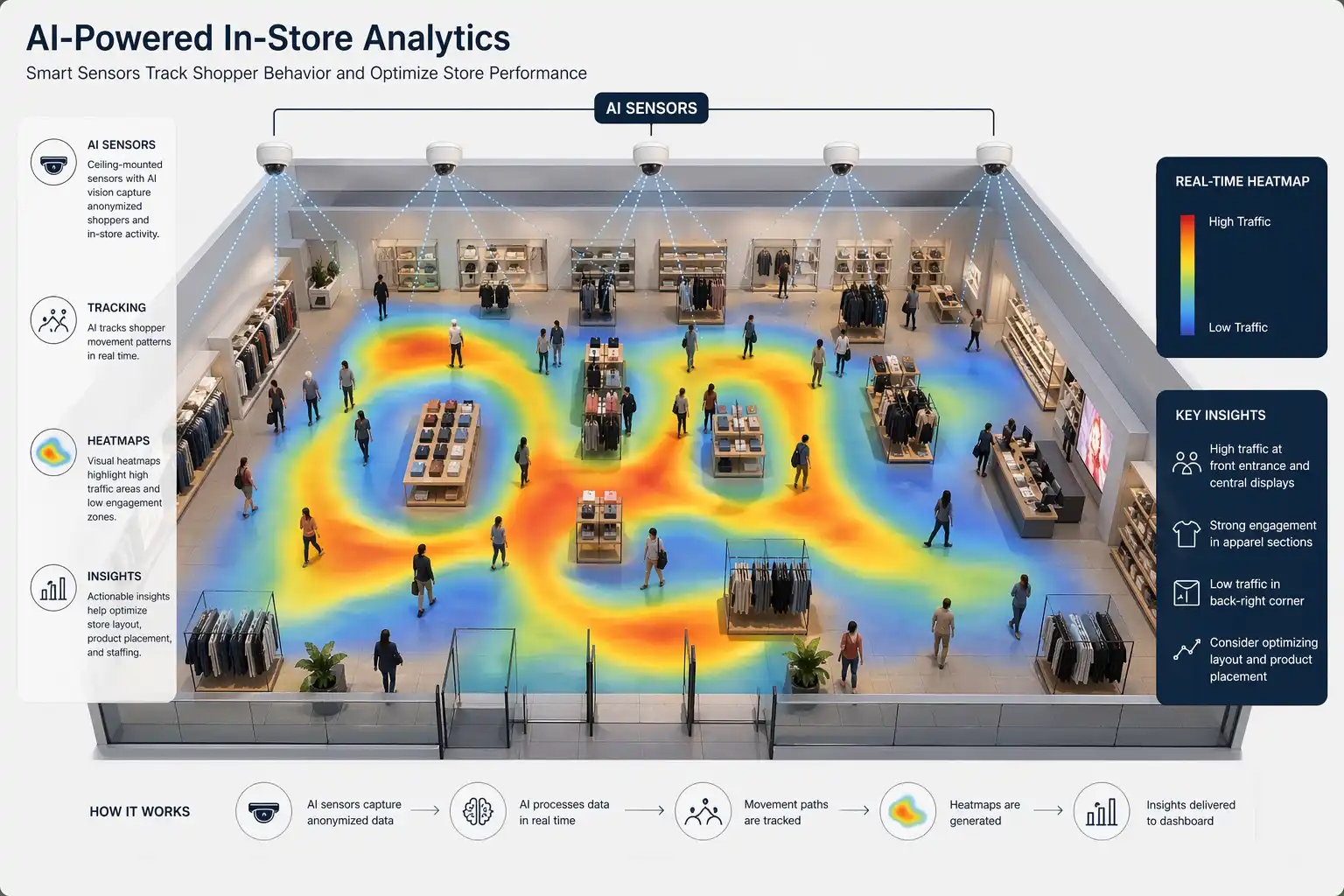
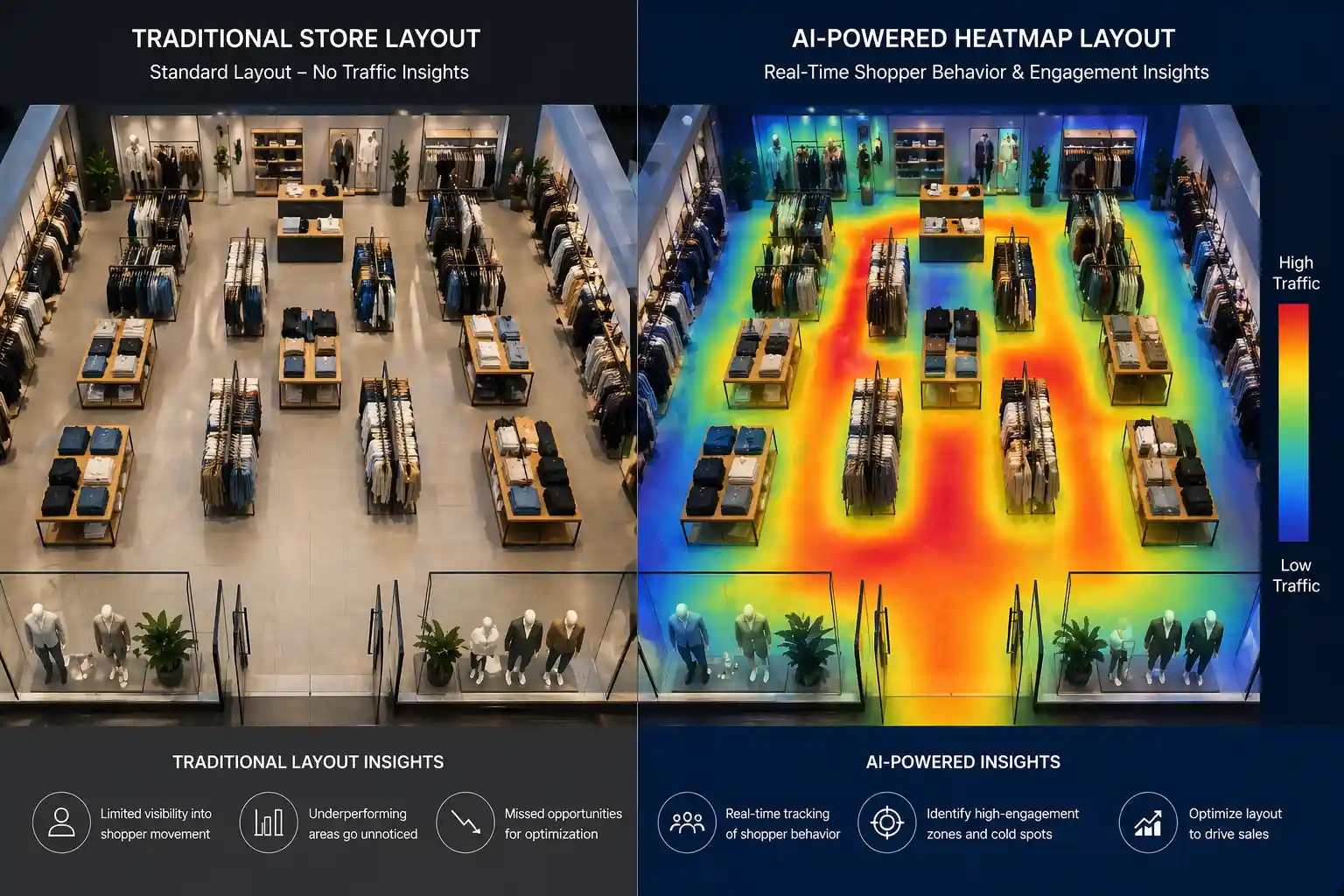
A store layout should guide shoppers toward your most profitable items. Many stores have “dead zones” where shoppers rarely go.
We use AI heatmap analysis for retail stores to improve store layout optimization and increase revenue. AI heatmaps show us exactly where these problem areas are.
2.1 Identifying the “Golden Path” and Dead Zone Recovery
AI heatmap analysis for retail stores helps identify the Golden Path and recover dead zones that cost you money. The “Golden Path” is the route most shoppers take through your store.
We can identify this path using shopper journey mapping. If your best products are not on this path, you are losing money. We can move high-margin items to these high-traffic areas to boost sales.
Dead zones are areas that shoppers consistently avoid. This often happens because of poor lighting or narrow aisles. We can use point-of-interest mapping to see why people turn away.
Sometimes, adding a “strategic anchor” like a popular brand can draw people back. This turns wasted space into a productive part of your floor plan.
2.2 4-Step Incremental Process for Floor Plan A/B Testing
We recommend a systematic approach to changing your layout. You should not change everything at once. Instead, use these four steps to test your ideas:
Measure: Record current dwell time measurement and traffic for two weeks.
Adjust: Move one display or change the width of one aisle.
Monitor: Use real-time monitoring to see how shoppers react.
Analyze: Compare the new aisle performance analysis with the old data.
This process helps you find “friction” in the store. Friction is anything that slows down or frustrates a shopper. It might be a crowded corner or a confusing sign. By removing friction, you make it easier for people to buy your products.
3. Workforce Management: Correlating Foot Traffic with Staffing ROI
Staffing is one of the biggest costs for any retail business. Having too many employees during quiet hours wastes money. Having too few during peak hours leads to lost sales.
We use AI heatmap analysis for retail stores to align your staff with actual customer needs.
3.1 Dynamic Labor Allocation Based on Peak Density
AI heatmap analysis for retail stores shows us when your store is most crowded. We can predict these peaks based on historical purchase patterns. This allows managers to schedule more staff during busy times.
We call this dynamic labor allocation. It ensures that help is available when consumer engagement is at its highest.
We also look at where staff members spend their time. Sometimes, employees cluster in the back of the store. AI helps us see if staff are positioned in high-traffic zones.
Proper placement increases the chances of an employee helping a customer. This directly improves your sales conversion rates.
3.2 Reducing Queue Abandonment through Real-Time Alerts
Long lines are the main reason for “queue abandonment.” This happens when a customer sees a long line and leaves without buying anything.
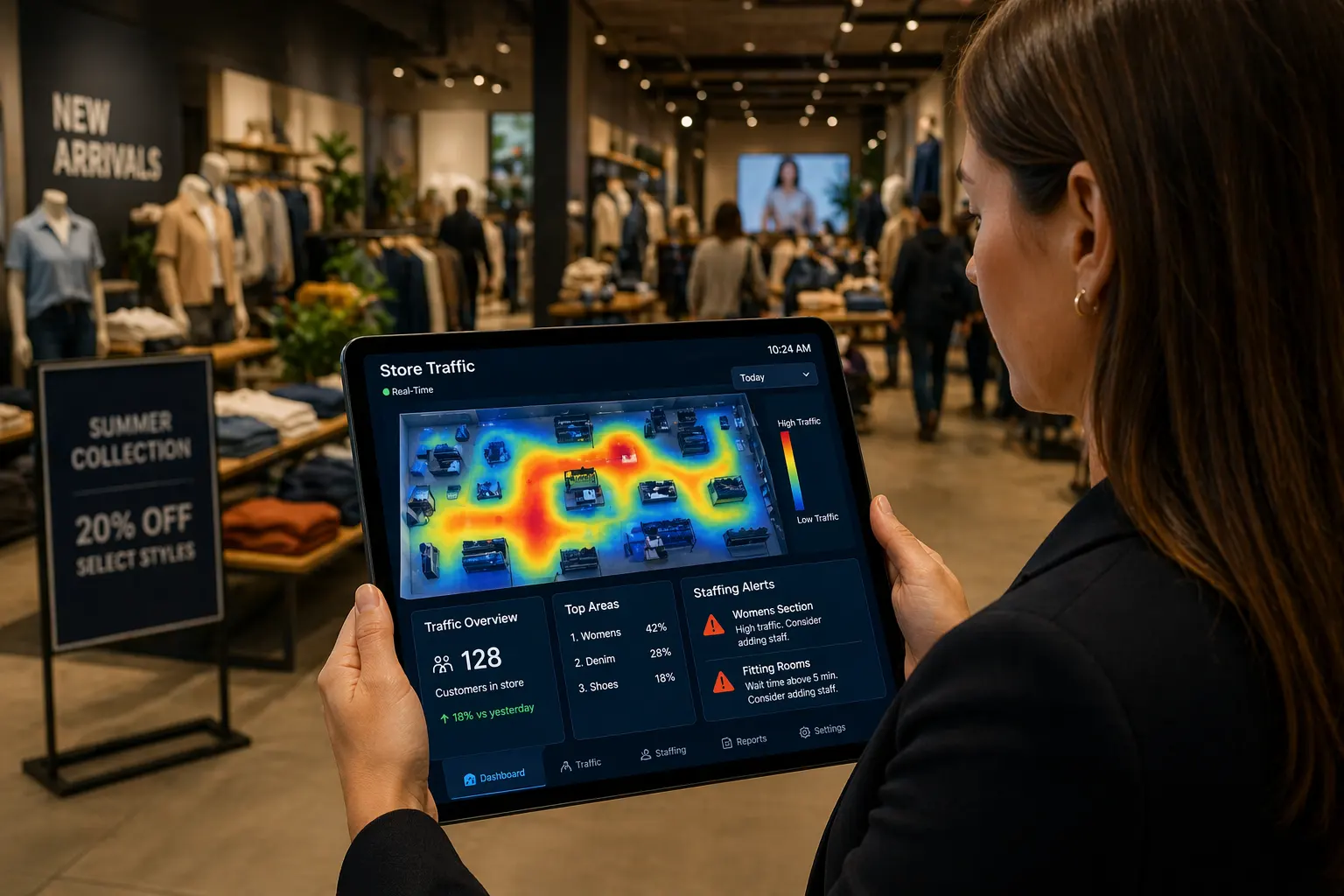
AI systems can detect when a line is getting too long. The system then sends a real-time monitoring alert to the manager.
We use predictive modeling to guess how long a wait will be. If the wait time exceeds five minutes, the manager can open a new register. This keeps the line moving and keeps the customers happy. Reducing abandonment is a fast way to increase daily revenue without finding new customers.
4. Data Ethics: Achieving GDPR Compliance through Anonymization
Shoppers care about their privacy more than ever before. We must collect data in a way that is ethical and legal.
AI heatmap analysis for retail stores aims to protect identity while collecting useful trends. This allows us to follow rules like GDPR and CCPA.
4.1 Anonymization Protocols and Vectorized Identity
Modern AI does not need to know who a person is. It only needs to know that a person is there. We use anonymization protocols to strip away personal details.
The system converts a person’s image into a “vector” or a simple dot on a map. This is called PII (Personally Identifiable Information) stripping.
Facial blurring is another important tool we use. The software automatically blurs faces in the video feed. This ensures that no one can identify the shoppers later.
We focus on customer behavior patterns rather than individual identities. This builds trust with your customers and protects your brand.
4.2 Edge Inference: The Security Standard for Retail Data
Edge inference is the safest way to handle data. Instead of sending video to a central server, the sensor processes it locally.
Only the anonymous data points are sent to the cloud. This means there is no video for hackers to steal. It is the gold standard for security in retail analytics today.
5. Supplemental Analysis: Answering Critical Implementation Questions
Many retailers have questions before they start using AI. It is important to understand how this technology fits into your current stack.
We have compiled the most common questions we hear from store owners.
5.1 Comparative and Strategic FAQs
How do AI heatmaps compare to Wi-Fi tracking?
Wi-Fi tracking relies on a shopper having their phone’s Wi-Fi turned on. It is often inaccurate because it cannot show exactly where a person is standing.
AI heatmap analysis for retail stores provides much better spatial data visualization than Wi-Fi tracking. It tracks everyone, not just people with smartphones.
Which retail categories see the fastest ROI?
Grocery stores and high-end fashion boutiques usually see the fastest returns. AI heatmap analysis for retail stores supports grocery retailers by analyzing aisle performance and helps fashion stores track interaction with displays.
Most stores see a return on investment within six to twelve months.
Do I need to hire a data scientist to read these heatmaps?
No, modern platforms are very user-friendly. They provide simple dashboards that show you visual heatmaps and clear charts. Most managers can learn to use the system in just a few hours. We recommend looking at the data weekly to make small adjustments.
6. Scaling Intelligence: Overcoming Risks and Integration Barriers
Starting with one store is easy, but scaling to fifty stores is a challenge. AI heatmap analysis for retail stores ensures data is consistent across all your locations.
We focus on breaking down “data silos” so you can see the big picture. This allows for better comparisons between different store branches.
6.1 Mitigating Integration Risks and Data Silos
A common risk is having data that does not talk to your POS (Point of Sale) system. AI heatmap analysis for retail stores integrates heatmap data with your POS sales data to close the conversion gap.
For example, if 100 people visit an aisle but only two buy something, you have a problem. This shopper journey mapping helps you fix those gaps quickly.
6.2 Future-Proofing: Moving from Observational to Predictive AI
AI heatmap analysis for retail stores is moving from observational to fully predictive intelligence. Future AI will suggest layout changes automatically based on purchase patterns.
This will help you plan your inventory and staffing even better. The future of retail is predictive, not just observational.
In conclusion, understanding your store is no longer a guessing game. You can now see exactly how shoppers move and where they spend their time.
This data allows you to optimize your layout and manage your staff with precision. We have seen that stores using these tools often see a significant boost in sales conversion rates.
By staying focused on customer behavior, you can stay ahead of the competition. Start small, test your ideas, and let the data guide your growth.
We are confident that AI heatmap analysis for retail stores will become a standard tool for every successful business.


15 Proven Methods on How to Consolidate Event Data Efficiently to Maximize Analytics ROI
6 Critical Strategies for Mastering IoT Foot Traffic Sensors: The Ultimate 2026 Accuracy Guide
7 High-Impact Strategies to Scale Revenue with Lead Capture Automation
6 Breakthrough Strategies to Master Store Layout Heatmap Analysis and Skyrocket Sales
11 Strategic Remote Store Performance Analytics Tactics to Revolutionize Retail Growth
10 Essential Variables for a Reliable KPI for Beauty Booth Evaluation